 Anvil Tools
Compare the bytes before blaming the hash
Two text samples can look identical and produce different SHA-256 digests. A trailing space, a line break, a different Unicode representation, or a change in JSON formatting can alter the bytes. The digest answers a byte-level question; it does not decide whether two texts have the same meaning.
We ran thirteen synthetic inputs through the actual Anvil Tools Hash Generator in Chrome and Edge on October 7, 2026. Every browser result matched an independent SHA-256 calculation using Node's crypto library. We checked the hexadecimal digest, its Base64 representation, and the reported UTF-8 byte count. Download the case definitions with expected digests, recorded browser results, and actual tool screenshot.
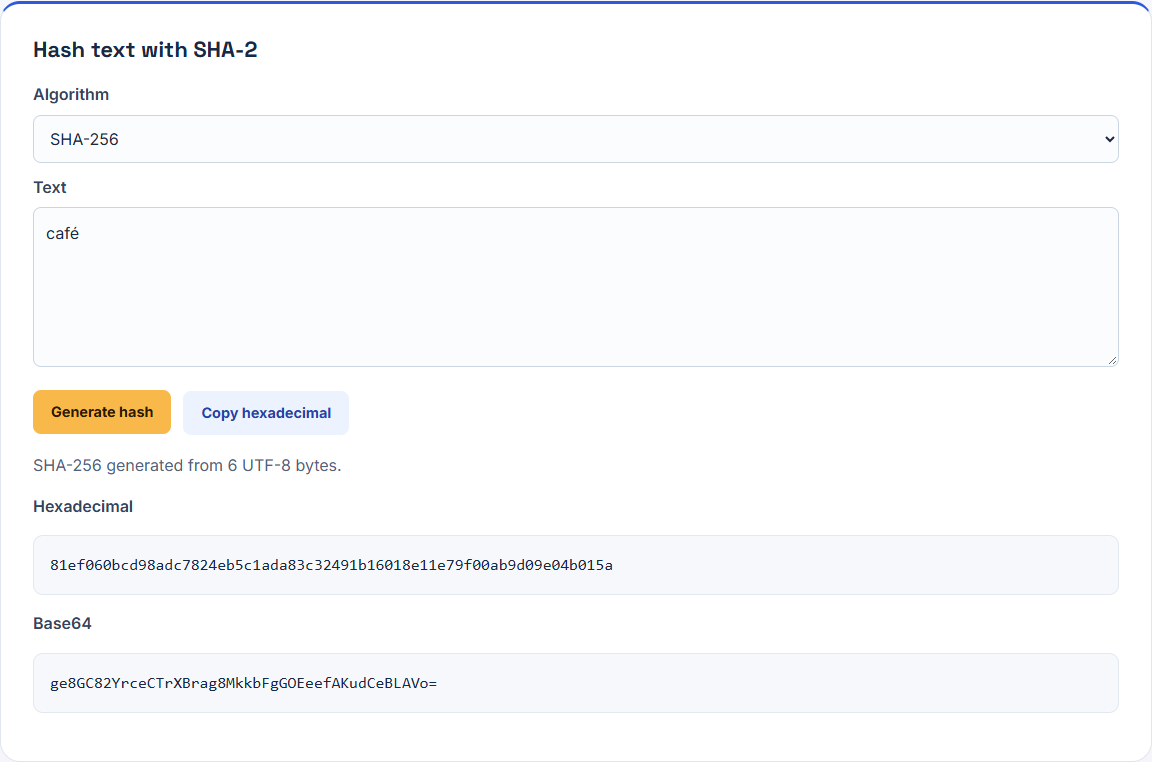
There is one important boundary: this is a text-input tool. It hashes the UTF-8 encoding of the textarea's current value. It is not a file-upload checksum utility. Pasting text from a file can change its representation before the hash operation runs.
A short checklist for a mismatched digest
| Check | Why it matters | What to compare |
|---|---|---|
| Algorithm | SHA-256 and SHA-512 are different operations | Algorithm name on both sides |
| Input bytes | Invisible differences change the input | UTF-8 bytes, whitespace, and code points |
| Line endings | A textarea can normalize CRLF to LF | Original file bytes versus current field value |
| Unicode form | One accented character can have different code-point sequences | Composed and decomposed representations |
| JSON serialization | Equal parsed values can have different serialized text | Whitespace, property order, and trailing newline |
| Output representation | Hex and Base64 can describe the same digest bytes | Decode the representation before comparing |
| Expected checksum source | An untrusted checksum cannot establish authenticity | Obtain the expected value through a trusted channel |
Start with the smallest failing synthetic sample. Changing several settings at once makes it harder to identify which boundary changed the data.
Establish a known baseline
Selecting SHA-256 and hashing abc produced three UTF-8 bytes and this hexadecimal digest:
ba7816bf8f01cfea414140de5dae2223b00361a396177a9cb410ff61f20015adWe included the empty string as another baseline. It produced a valid SHA-256 digest and a zero-byte status; empty input was not treated as a failed operation. These controls help distinguish a data mismatch from a missing result or the wrong algorithm.
The tool uses TextEncoder followed by the browser's Web Crypto digest operation. The digest API documentation describes hashing supplied bytes; TextEncoder supplies the UTF-8 encoding for this text workflow. Neither step automatically decides which whitespace or Unicode form your application should regard as equivalent.
A trailing space or newline is part of the input
We tested abc, abc , and abc followed by a line feed. Their byte counts were three, four, and four. All three digests differed, even though the latter two contained the same number of bytes.
The extra byte for the space is 20 in hexadecimal. The extra byte for the line feed is 0a. Equal length does not imply equal content. A byte count is a useful first diagnostic, but it cannot identify every mismatch.
When copying a checksum example from a terminal, editor, or document, check whether its input included a final newline. Many text files intentionally end with one. Do not remove it simply to make a digest match unless the producer's documented input excludes it.
For the same reason, avoid silently trimming a value before hashing. Trimming can be an appropriate application rule when explicitly specified, but it changes the data being checked.
The CRLF result shows a textarea boundary
Our harness assigned abc followed by CRLF to the actual textarea. Reading its current value returned abc followed by LF. The tool reported four UTF-8 bytes and returned the same digest as the LF fixture.
The original CRLF string contains five UTF-8 bytes: three letters plus carriage return and line feed. That five-byte sequence was not what this textarea supplied to the digest operation. This result is a limitation of the text-entry workflow, not evidence that SHA-256 ignores carriage returns.
If you need to compare an expected checksum for a downloaded file, hash the original file bytes with a file-capable utility. Pasting the file into this tool cannot establish its original encoding, byte-order mark, or line endings. For API text debugging, record the value at the actual boundary you intend to compare.
Café can contain different Unicode sequences
Our composed café used U+00E9 for the final character and occupied five UTF-8 bytes. The decomposed version used an ordinary e followed by U+0301 COMBINING ACUTE ACCENT and occupied six bytes. The words looked similar, but the recorded digests differed.
We added a third fixture prepared in NFC form. It contained the same text representation as the composed fixture and produced the same digest. The tool did not perform normalization itself; the fixture had already been prepared that way.
JavaScript's Unicode normalization documentation explains normalization forms. Choose a form only when the application contract permits it. Normalizing a payload while verifying a checksum for its original bytes defeats the purpose of that comparison.
To inspect a small synthetic value before hashing, a browser-console check can make the invisible boundary explicit:
const sample = "cafe\u0301";
[...sample].map(character =>
  character.codePointAt(0).toString(16)
);
// ["63", "61", "66", "65", "301"]

new TextEncoder().encode(sample).length;
// 6
Run diagnostics with a synthetic example rather than a password or live token. A character dump makes the complete input visible to whoever can read the console.
JSON formatting changes a text digest
Our compact JSON fixture was:
{"id":"001","active":true}The pretty version contained the same properties and values, but added indentation, spaces, and line feeds. Its digest differed. A compact version with the properties in the opposite order also produced a different digest.
Those observations do not mean one JSON document is invalid. They mean the serialized strings are different inputs. Parsing both documents and comparing their application values is a separate task from comparing their serialized bytes.
For a recorded payload checksum, preserve the exact serialization and whether a final newline is present. For a signature or protocol that requires canonical JSON, follow that protocol's canonicalization rules. Minifying with JSON Formatter does not establish a general canonical representation, and parsing can introduce its own data changes. Our JSON edge-case experiment records duplicate-key and large-integer behavior that matters before any reserialization.
Thirteen cases, with differences readers can reproduce
| Fixture | Browser UTF-8 bytes | Observed relationship |
|---|---|---|
| Empty text | 0 | Valid empty-input digest |
abc | 3 | Baseline |
abc followed by LF | 4 | Different from baseline |
abc followed by a space | 4 | Different from both baseline and LF |
Requested abc followed by CRLF | 4 after textarea normalization | Same as LF fixture |
Composed café | 5 | Different from decomposed form |
Decomposed cafe plus combining accent | 6 | Different bytes despite similar appearance |
| NFC-prepared accent fixture | 5 | Same as composed fixture |
| Compact JSON | 26 | Different from pretty JSON |
| Pretty JSON | 35 | Same application values, different text digest |
| Compact JSON with reversed property order | 26 | Same length as compact fixture, different digest |
a b with ordinary space | 3 | Different from nonbreaking-space fixture |
a b with nonbreaking space | 4 | Visually similar separator, different bytes |
The exact strings and full digests are in the downloadable fixtures. The final two rows use U+0020 and U+00A0 respectively. That example is useful when text copied from a document appears to contain a normal space but does not compare as expected.
Hexadecimal and Base64 are two representations
SHA-256 produced 32 digest bytes. The tool displayed those bytes as 64 hexadecimal characters and also as Base64. Comparing the two displayed strings directly would report a difference even though both describe the same digest.
In this experiment, we independently calculated both representations and checked every browser result. If two systems use different output formats, first establish their format and decode each to digest bytes before comparison. Do not Base64-decode the original text merely because one system displays its digest in Base64; those are different stages.
The Base64 tool is useful for controlled text transformations, but a checksum workflow must distinguish the original message from the representation of its digest.
Match the check to the job
Use the Hash Generator to compare exact synthetic text at a known UTF-8 boundary. Use a file-capable checksum utility when you need a digest of a file's original bytes. Use a protocol's prescribed serialization and signature operation when you are implementing signed requests.
A plain digest does not encrypt data, verify a JWT signature, or identify who supplied a file. An attacker who can replace both a file and an untrusted expected digest can make them match. Password storage also needs a dedicated password-hashing design; this text utility is not that workflow. These distinctions keep a successful calculation from being mistaken for a different kind of verification.
Repeat the results and record the boundary
- Download a fixture and select SHA-256 in the tool.
- Enter the fixture's exact text, including any final whitespace.
- Compare the reported UTF-8 byte count, hexadecimal digest, and Base64 digest with the recorded result.
- For the CRLF case, compare the requested input with the textarea's actual value; the case file records both expectations.
- Record whether your real application hashes original bytes, decoded text, normalized text, or reserialized JSON.
The browser checks ran thirteen cases per browser in Chrome 154 and Edge 154 on Windows. They do not benchmark performance, test arbitrary file sizes, or establish behavior for every editor and clipboard. The result file records exact versions and the independent comparison method.
Text processing happens in the browser, while page and asset loading still uses network requests. The Privacy Policy describes those distinctions. For a connected CSV-to-JSON-to-Base64 workflow with a saved digest, see the developer debugging guide. For another transformation boundary that changes a value before it reaches an API, see the URL-encoding experiment.