 Anvil Tools
What we wanted to check
A formatter can reject broken syntax while accepting data that has already lost information. We tested the Anvil Tools JSON Formatter with ten malformed inputs and four valid controls. The most consequential results were in the controls: repeated object keys collapsed to the last value, and a large numeric identifier changed by one.
These are actual local browser runs, recorded on October 6, 2026. The results and browser versions identify each input, output, and displayed status. The input fixture includes the expected output used for comparison. All inputs are invented; no credentials or customer records are involved.
Ten rejected inputs
Open the tool, paste one input, and select Minify JSON. Each of these inputs produced an error status and an empty output. Formatting with indentation uses the same parser. Error wording can vary by browser version, so the portable outcome is rejection and cleared output, rather than a particular sentence.
| Case | Exact input | Observed result |
|---|---|---|
| Trailing comma | {"a":1,} | Rejected |
| Single quotes | {'a':1} | Rejected |
| Unquoted key | {a:1} | Rejected |
| Inline comment | {"a":1/* note */} | Rejected |
| Unfinished string | {"a":"unfinished} | Rejected |
| Leading zero | {"a":01} | Rejected |
| Not-a-number token | {"a":NaN} | Rejected |
| Undefined value | {"a":undefined} | Rejected |
| Extra closing brace | {"a":1}} | Rejected |
| Missing colon | {"a" 1} | Rejected |
A separate check submits the trailing-comma input after a successful result. The error path clears the output so an earlier valid object cannot be mistaken for the current result. The input stays available for correction.
Correct these examples according to the intended data. Double-quote keys and strings, remove the extra comma, and restore missing punctuation. Replace an unsupported value deliberately: null, a number, and the string "undefined" mean different things. A JavaScript object literal or configuration file with comments is not necessarily JSON; removing comments blindly can also damage strings containing comment-like characters.
A valid object that loses a key
The duplicate-key control was accepted:
{"role":"reader","role":"editor"}The result was:
{"role":"editor"}The page reported “JSON is valid.” That message describes successful parsing. It does not certify that the original object was unambiguous. The browser's parser retains the last value for the repeated key, and the formatter serializes that parsed object. It cannot reconstruct the discarded first value from the output.
If a supplier sends repeated keys, save the original text and resolve the conflict at the source. Do not use a formatted copy to prove that the original data had only one role field. For security-sensitive configuration, validate duplicate keys before parsing with a tool that explicitly supports that check.
A valid number that changes
The numeric input was {"id":9007199254740993}. Its minified output was {"id":9007199254740992}. Both browsers accepted it; neither the green status nor clean indentation prevented that change.
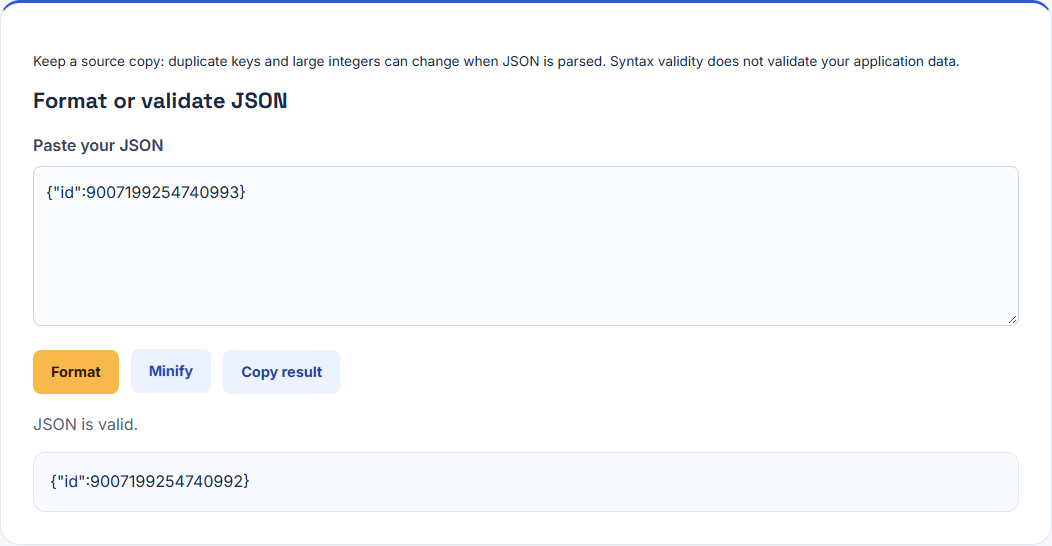
This formatter uses JavaScript numbers, whose safe integer range ends at 9007199254740991. The tested number cannot be represented exactly in that number type. The precision loss happens during parsing, before the tool creates its output. A later hash or text comparison can detect that the bytes differ, but cannot recover the lost digit.
Our string control, {"id":"9007199254740993"}, preserved the identifier exactly. Treat identifiers as strings when the API contract allows it. If a contract requires arbitrary-precision numbers, use an appropriate parser and verify the receiving system; changing the field type without agreement can break that contract.
A workflow that preserves evidence
Keep the source response separately. Use formatting for inspection, then compare the output with the source when repeated keys, numeric IDs, or exact text matter. Check the application schema and required fields separately: a syntactically valid object can still be the wrong response.
The four controls cover nested values, repeated keys, numeric precision, and a string ID. They establish these specific behaviors, not a complete JSON conformance suite or a guarantee for very large files. The developer workflow connects these checks with encoding and hashes. The CSV experiment shows why converting every field to a string can preserve information that numeric coercion would discard.