 Anvil Tools
The conversion boundary we tested
CSV looks simple until a comma belongs inside a value, a field contains a line break, or a spreadsheet exports an identifier with leading zeros. We ran thirteen fixtures through the actual Anvil Tools CSV to JSON converter. Nine produced JSON; four produced an error and cleared the result. One of the accepted fixtures illustrates a limitation: semicolons are treated as ordinary text rather than detected as a delimiter.
The test used synthetic records on October 6, 2026. Download the inputs and expected values and the observed results. Each result records whether the “First row contains headers” control was checked. That setting changes the output structure and needs to be part of any reproduction.
Commas, quotes, and line breaks
With headers enabled, this source has two columns and one data row:
name,note
Ada,"red, blue"
The output preserved red, blue as one string. A comma inside quotes does not create a third column. For a literal quote inside a quoted field, the input "She said ""hello""" produced She said "hello". The doubled quote is CSV escaping; it is not retained as two quote characters in the JSON value.
Our multiline fixture was:
name,note
Ada,"first
second"
It produced one record whose note contained a line-feed character. JSON displays that character as \n inside its quoted string. There are three visible source lines, but only two CSV records: the header and one data row.
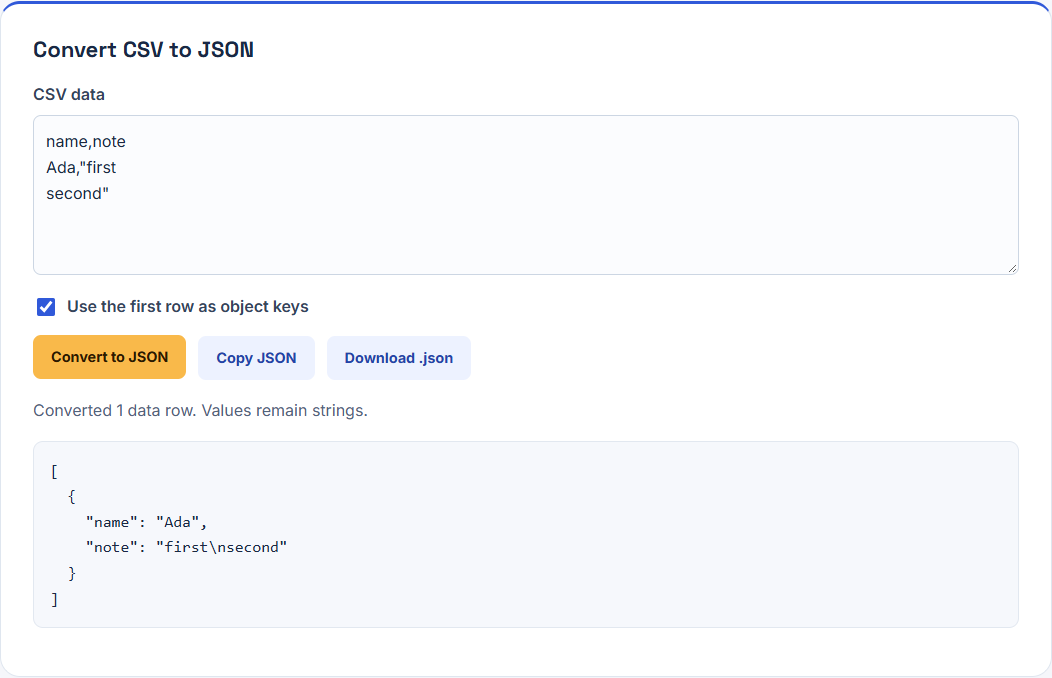
Count records with a parser that respects quoting. Splitting the source on every newline would turn the second half of this value into a separate record. Likewise, splitting each line on commas would damage the first fixture.
Results across all thirteen cases
| Fixture | Observed behavior |
|---|---|
| Quoted comma | Preserved inside one value |
| Escaped quote | Two CSV quotes became one literal quote |
| Quoted newline | Preserved in one string |
| Unicode | Preserved Zoë, Chinese text, and emoji |
| Blank fields | Preserved empty strings |
| Numeric strings | Preserved 0012 and false as strings |
| UTF-8 byte-order mark | Removed at the beginning of the source |
| Headers disabled | Returned arrays, including the first row |
| Duplicate header | Rejected: header names must be unique |
| Short row | Rejected: one column where two were expected |
| Extra column | Rejected: three columns where two were expected |
| Unclosed quote | Rejected: source ends inside a quoted field |
| Semicolon input | Accepted as one column; delimiter not detected |
Empty does not mean null
For name,note followed by Ada,, the output note was "". It was not null, an omitted property, or a default note. A second record with an empty name was also accepted because field values can be empty even though header names cannot.
The numeric fixture retained the leading zeros of 0012; false remained a string rather than a boolean. That behavior is useful for codes and IDs, but downstream systems may require typed values. Convert selected fields using the destination schema, then validate. Avoid global numeric coercion: a postal code, an account identifier, and an amount can all contain digits while having different meanings.
Why the failure cases matter
Duplicate headers would map two values to the same JSON property. The tool rejects that source instead of silently overwriting one. It also checks every row against the first row's width. The short-row result was “Row 2 has 1 columns; expected 2.” An extra column produced the corresponding three-column error. In both cases there was no partial JSON result to download.
An unclosed quote is not automatically repaired. Adding a quote at the end may be correct, or may hide a missing chunk of data. Compare with the source export before repairing the file.
The accepted semicolon trap
The input name;note followed by Ada;ok produced a property named name;note and a value Ada;ok. That is valid JSON and consistent with a comma-only parser, but it is not the intended two-column conversion.
Check the headers and at least one representative record after every conversion. If a regional spreadsheet exports semicolons, choose a comma-separated export. Do not replace every semicolon indiscriminately, because a semicolon can also belong inside a field value. The tool does not promise automatic delimiter detection or support for every CSV dialect.
Repeating the experiment
Load a fixture, set the header control, convert, and compare parsed JSON values with the expected fixture. JSON indentation is incidental; the strings and array structure are the important comparison. Browser textareas can normalize pasted CRLF newlines to LF, so these results do not establish preservation of the source file's exact bytes.
Our thirteen cases cover common editing mistakes, not arbitrary file sizes or every dialect. Use the JSON experiment to see the next conversion boundary, and the developer guide for a connected CSV, JSON, Base64, and digest workflow.